There are a few tricks to getting RealPlayer to work right under x86_64 Linux. Realplayer is a 32-bit application and needs a bit of coercing to run smoothly.
First, get the installer from Real’s site. Download the normal installer, named something like RealPlayer11GOLD.bin, instead of the RPM version. To use the installer and RealPlayer, you’ll need to get 32-bit versions of some common libraries.
$ sudo apt-get install ia32-libs ia32-libs-gtk
Navigate to the directory where you saved the installer and run:
$ chmod +x ./RealPlayer11GOLD.bin

$ ./RealPlayer11GOLD.bin
The installation is self-explanatory. I installed to ~/software/RealPlayer. The installer adds a link in the GNOME Sound & Video menu. It doesn’t work though.
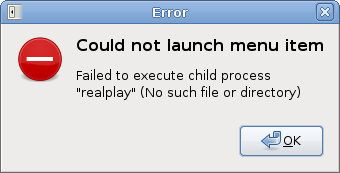
This is because I installed as a normal user instead of root. It didn’t add a link to RealPlayer in the system path. To solve this problem, add a shell script like the following to a directory in your path:
#!/bin/bash
exec /home/avery/software/RealPlayer/realplay $@
Name the script realplay and make it executable. Obviously, replace /home/avery/software/RealPlayer with whatever directory you installed RealPlayer to. I put this script in ~/bin, which is in my path. Now, you should be able to launch RealPlayer from the command line, but the menu item still might not work. If you added the script to a location in the system path, like /usr/bin, it will work fine. In my case, I put it in ~/bin, which is in my path, but not the system path. To fix this, you can modify the .desktop entry for RealPlayer, which is installed as ~/.local/share/applications/realplay.desktop. Replace the line:
Exec=realplay %U
with:
Exec=/home/avery/bin/realplay %U
The GNOME menu doesn’t expand ~, so you need to enter the full path to the script. Now, the menu item should work. The next thing you might notice is that while RealPlayer works, it looks awful.
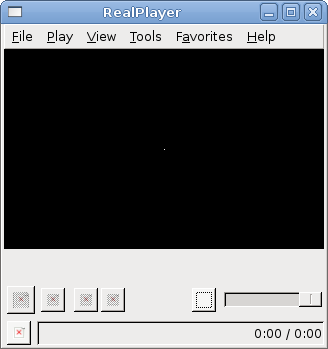
This happens because Debian’s version of ia32-libs-gtk has some packaging bugs. See Debian bug #484581. To solve this, we’ll run RealPlayer in a 32-bit chroot instead of using 32-bit libraries in a normal x86_64 installation. I’m not going to get into setting up a 32-bit chroot here. Instead follow the instructions in the Debian GNU/linux AMD64 HOW-TO. Be sure to setup schroot. schroot makes using a 32-bit chroot very simple. Once the chroot is setup and schroot is working, modify the realplay script as follows:
#!/bin/bash
real_path=/home/avery/software/RealPlayer/realplay
if [ -f /etc/debian_chroot ]; then
    exec $real_path $@
else
    exec schroot -p $real_path $@
fi
Basically, if the /etc/debian_chroot file exists, it runs RealPlayer directly. Otherwise, it runs RealPlayer using schroot. I don’t think standard chroot creates the /etc/debian_chroot file, but schroot does. The reason the script doesn’t always run RealPlayer using schroot is that applications that are already in a chroot, like firefox, may need to run RealPlayer. There’s no point in creating yet another chroot if we’re already in one.
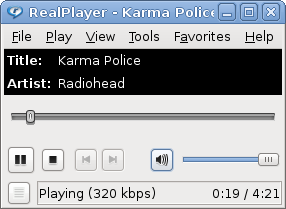
It works!
Update: After a bit of testing, I think it’s better to add a link to the realplay script system-wide. In addition to the GNOME menus, firefox only looks in system-wide paths. You’ll probably want to add a link in your chroot as well:
$ sudo ln -s /home/avery/bin/realplay /usr/bin/realplay

$ sudo ln -s /home/avery/bin/realplay /var/chroot/lenny-ia32/usr/bin/realplay
2 replies on “RealPlayer on x86_64 (amd64) Debian Linux”
You have typo in first command – we need to install package ia32-libs instead of ia32-lib.
Workaround for “ugly interface” w/o 32bit chroot is to execute realplay with:
GTK_PATH="/usr/lib32/gtk-2.0" realplayFixed, thanks.